Pre-Processing
The examples below show how to create single .inc-files, loading all .inc files using the Balmorel class, and defining geography using an interactive GUI. A notebook can also be downloaded from the GitHub repository.
Create an .inc File
The ‘IncFile’ class is a handy class for creating .inc files that are the input for Balmorel. The example below will create annual electricity demand (DE.inc) for electricity nodes DK1 and DK2 in the scenario ‘sc1’ of a Balmorel folder.
from pybalmorel import IncFile
import pandas as pd

# Initiate .inc file class
DE = IncFile(name='DE',
            prefix="TABLE   DE1(RRR,DEUSER,YYY)   'Annual electricity consumption (MWh)'\n",
            suffix="\n;\nDE(YYY,RRR,DEUSER) = DE1(RRR,DEUSER,YYY);",
            path='Balmorel/sc1/data')


# Create annual electricity demand
DE.body = pd.DataFrame(index=['DK1', 'DK2'], columns=[2030, 2040, 2050],
                       data=[[17e6, 20e6, 25e6],
                            [14e6, 17e6, 20e6]])

# Fix the index format (in this case, append the DEUSER set to RRR)
DE.body.index += ' . RESE'

# Save .inc file to path (will save as ./Balmorel/sc1/data/DE.inc)
DE.save()
Building the body from long-format data
Data often comes in long format, with one column per set and a value column. IncFile.body_prepare pivots such a DataFrame into the table layout of an .inc file, joining multiple index or column levels with “ . “ as GAMS expects:
DE = IncFile(name='DE',
            prefix="TABLE   DE1(RRR,DEUSER,YYY)   'Annual electricity consumption (MWh)'\n",
            suffix="\n;\nDE(YYY,RRR,DEUSER) = DE1(RRR,DEUSER,YYY);",
            path='Balmorel/sc1/data')

DE.body = pd.DataFrame({
    'R': ['DK1', 'DK1', 'DK2', 'DK2'],
    'DEUSER': ['RESE', 'RESE', 'RESE', 'RESE'],
    'Y': [2030, 2050, 2030, 2050],
    'Value': [17e6, 25e6, 14e6, 20e6],
})

# Rows become 'DK1 . RESE' and 'DK2 . RESE', columns become the years
DE.body_prepare(index=['R', 'DEUSER'], columns=['Y'])
DE.save()
body_prepare also takes values (the value column, defaults to ‘Value’), aggfunc (how duplicates are aggregated, defaults to ‘sum’) and fill_value (what empty cells become, defaults to an empty string). Use IncFile.body_concat(df) to append another long-format DataFrame to the body before calling body_prepare.
Loading all .inc Files
The ‘Balmorel’ class can be used to load all .inc files into python. Note that it will also create a .gdx called ‘scenario_input_data.gdx’ in the model folder. The function ‘symbol_to_df’ can then be used to create dataframes from elements in the .gdx file.
from pybalmorel import Balmorel
from pybalmorel.utils import symbol_to_df

# Initiate Model Class
model = Balmorel('path/to/Balmorel')

# Load base scenario input data
model.load_incfiles('base')

# Print electricity demand dataframe
print(model.get_input('DE'))
Defining Geography
pybalmorel includes a GUI to interactively define nodes in Balmorel’s hierarchical geographic structure comprising countries, regions and areas. Note: This requires the eel module - install with pip or whatever package manager you are using:
pip install eel
from pybalmorel import GUI
GUI.geofilemaker()
The video below illustrates how it works.
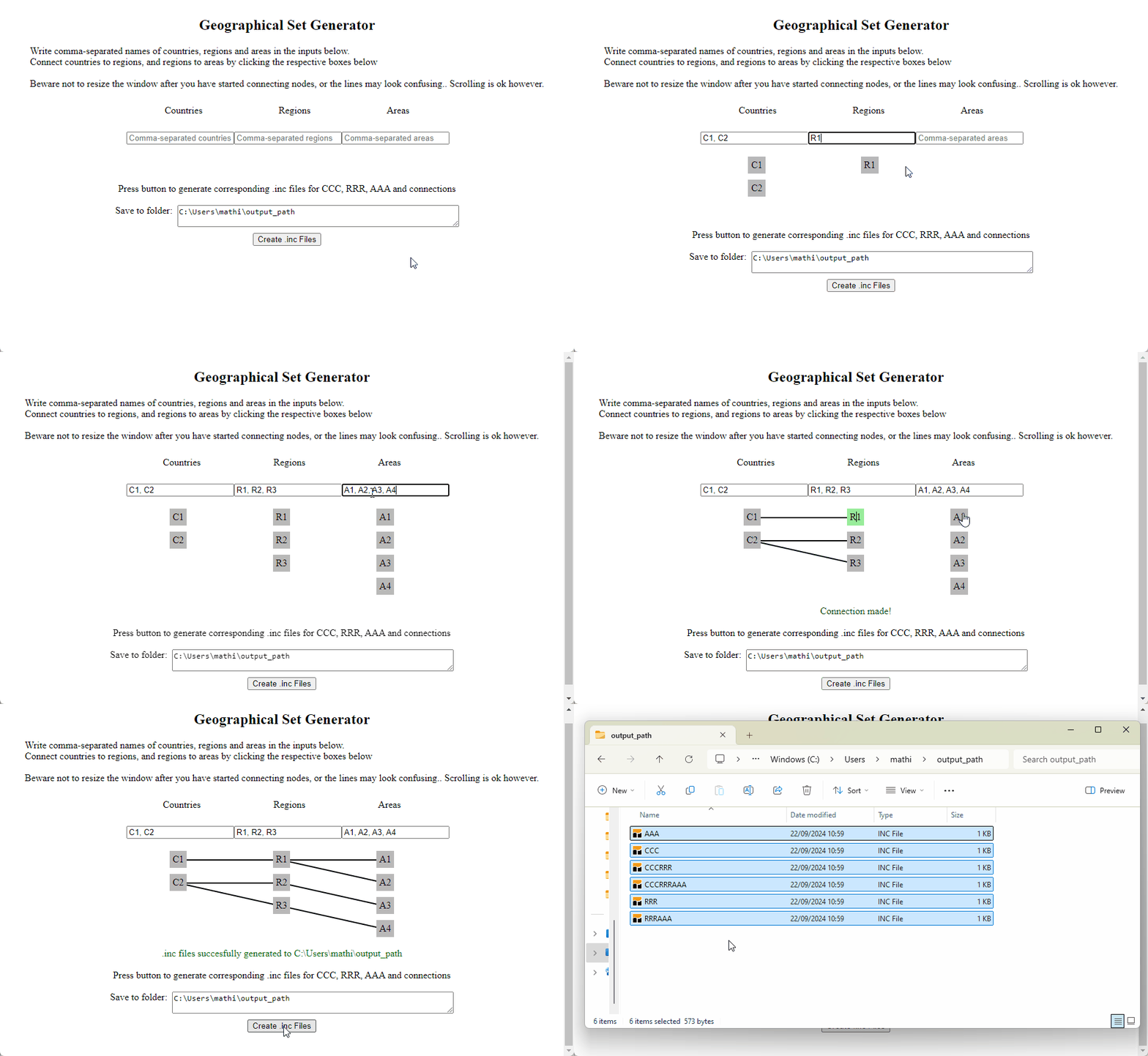
How to use the ‘geofilemaker’ GUI.
Downloading Technology Catalogues
The technology catalogues from the Danish Energy Agency are useful and streamlined data inputs for energy system modelling. The function below will check if the electricity and district heating technology catalogue exists in the specified path (the working directory in this case) and download it if it does not exist in the path:
from pybalmorel import TechData

TD = TechData(path='.')
print('Available technology catalogues: ', list(TD.files.keys()))

TD.download_catalogue('el_and_dh')
Note that TechData.download_all_catalogues will look for or try to download all catalogues. Downloaded catalogues can be loaded into a DataFrame with TechData.load, e.g. TD.load('el_and_dh'), which requires openpyxl (see installation).